Compare and accept quotes
Vendors quote pitch by pitch. You compare the quotes for one pitch side by side, then accept any of the pitches in a quote, at the option you choose. Accepting records your agreement with that vendor. Airship is not a party to it and takes no payment.
What a quote holds
- Who pays whom, stated by the vendor for every pitch: they pay you a fee, you pay them, they pay you a share of their takings, or they trade direct with the public.
- A price: flat for the event, per day, per head, per metre, or a pitch fee.
- VAT, only on pitches where you pay the vendor: 20%, 5% or 0%, or none when the vendor is not VAT-registered. On a fee the vendor pays you, any VAT is yours to charge: + VAT if you charge it.
- At most one alternative per pitch, from the vendor's own published listings that fit the object, with the size they state beside the size on your plan: Fit compares the size the vendor states with this pitch’s size on your plan. Footprint only: access, clearance and serving side are not checked, and it is not a sign the unit is safe for this spot. A vendor cannot add items you did not ask for; anything extra goes in their conditions.
- A package price, optional, when every pitch in the quote goes the same way. It applies only when you accept every pitch it covers at once, each at the first option. Otherwise the line prices stand.
- An open-until date, shown as Open until 30 Nov: the quote can be accepted until the end of that day, UK time. After it, the quote reads Past its open-until date and cannot be accepted.
- A deposit, cancellation terms, conditions and what the vendor needs on site, in their own words under From the vendor.
Quotes are in pounds sterling only. Every figure is the vendor's own and is not checked by Airship.
Versions
A vendor can revise their quote while the request is open. Each version has a short reference, for example Quote v2 · 26 Oct · ref 3f9a12c0 · replaces v1. Only the newest version can be accepted. Pitches you have already accepted stay at the price you accepted.
Comparing
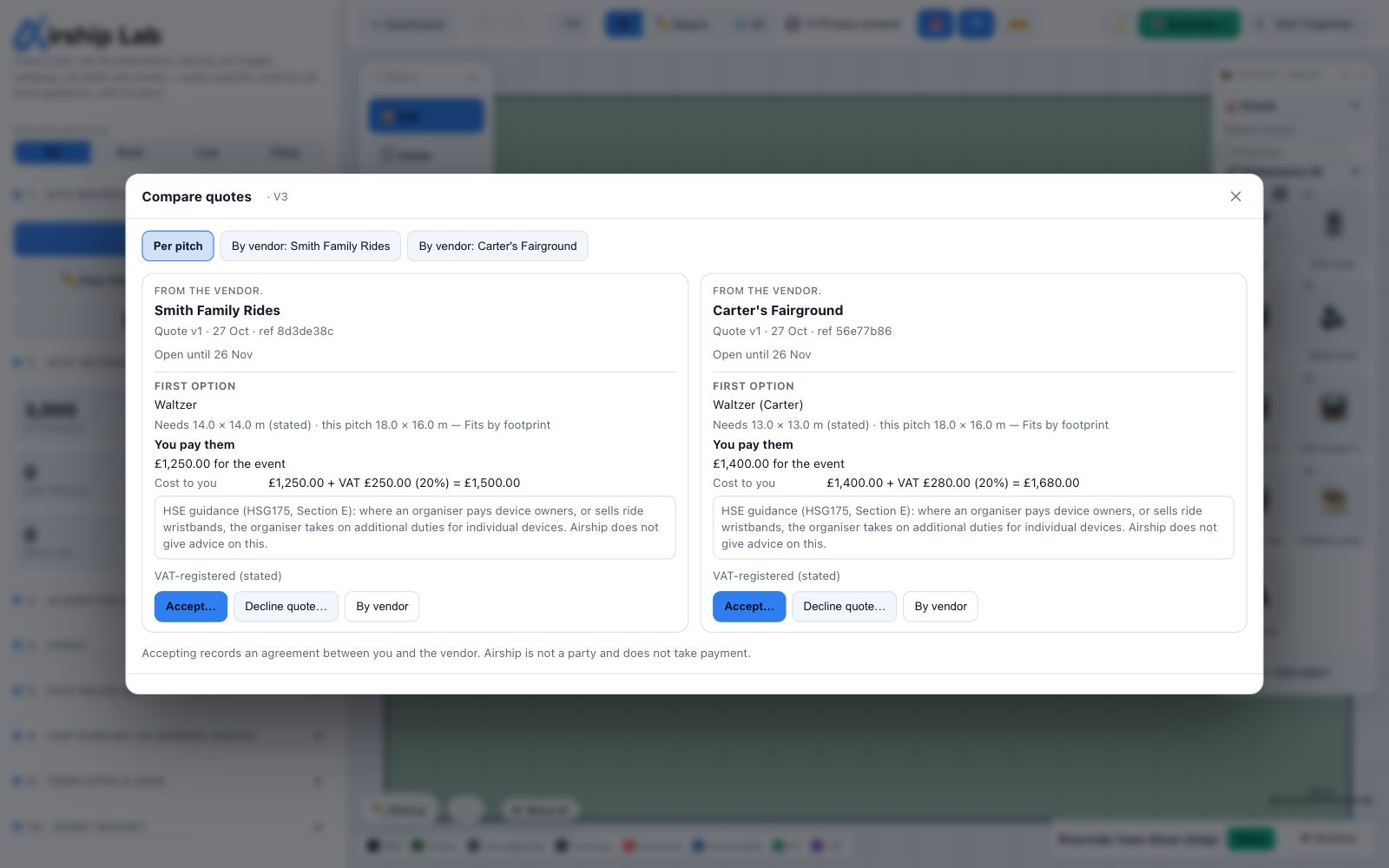
Quotes (2) on a pitch row opens Compare for that pitch: one column per vendor with a quote that prices it. Cost to you and Income to you are separate rows and are never netted against each other. By vendor shows one vendor's request with the whole quote's totals.
On a pitch where you would pay for a ride, an inflatable or an attraction, Compare carries this note: HSE guidance (HSG175, Section E): where an organiser pays device owners, or sells ride wristbands, the organiser takes on additional duties for individual devices. Airship does not give advice on this.
Accepting
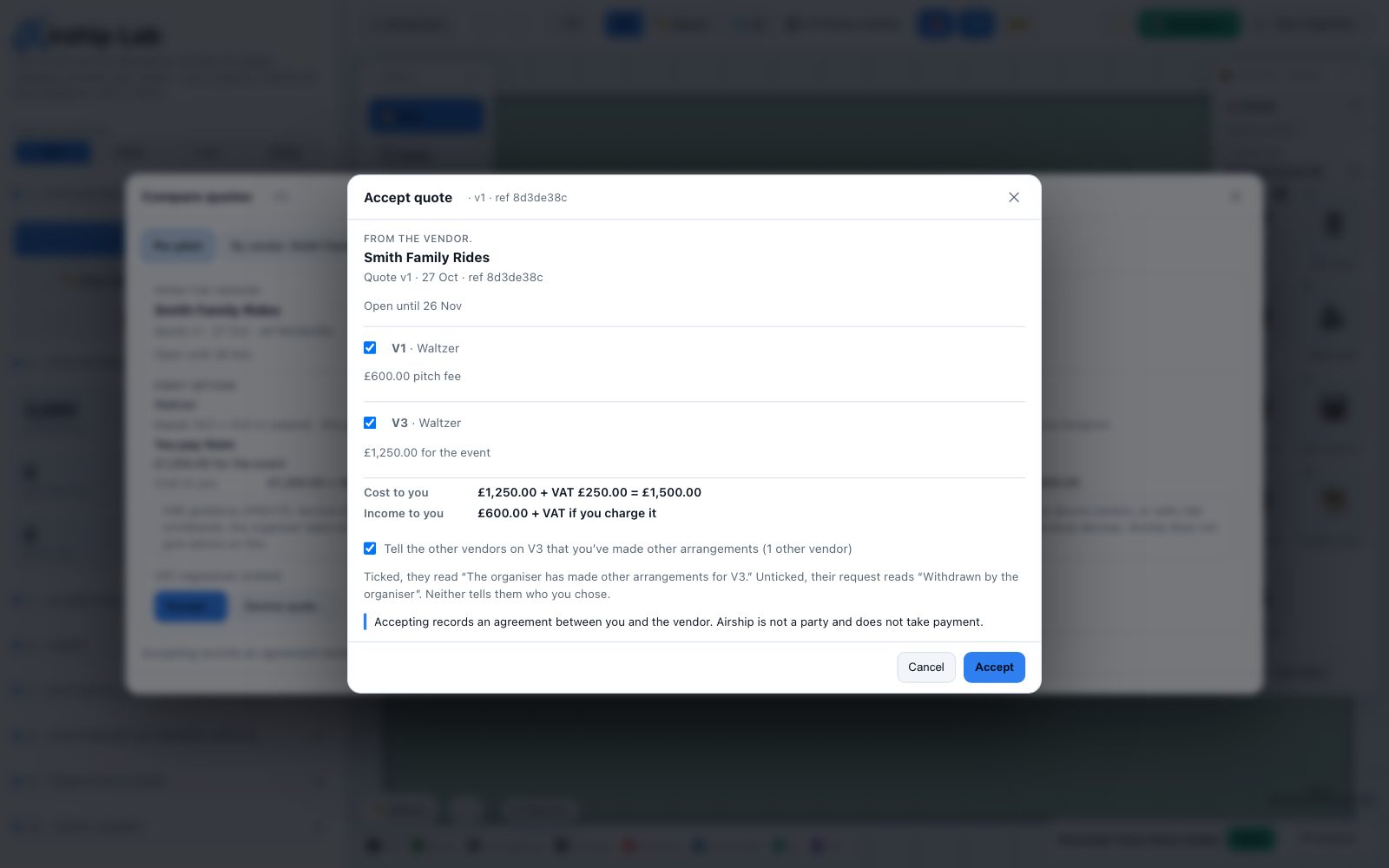
Accept… lists the pitches priced in the quote. The pitch you opened it from is ticked; the vendor's other open pitches in the quote are offered unticked. Choose the first option or the alternative for each. The window adds up the cost and the income for what is ticked and says whether the package price applies: Line prices apply, or that the package applies because you are accepting every line at the first option.
The not-chosen note is ticked by default: Tell the other vendors on V3 that you’ve made other arrangements. Each of them then reads The organiser has made other arrangements for V3. It never names the vendor you chose, never says another vendor was chosen and never shows anyone's price. Untick it, and for them the pitch simply reads as withdrawn by the organiser.
After you accept:
- the pitch is Booked and the vendor is told by email;
- the vendor's other pitches in the quote stay open for you to accept or leave;
- other vendors' open requests for that pitch close;
- the agreed figure appears in your budget, and the pitch leaves your RFQ pack: see Booked vendors in your budget.
If the quote changed while you were looking (a new version, a withdrawal, or its open-until date passed), you are asked to reload and look again. If two people act at the same moment you may see Someone else changed this at the same moment. Try again.
Declining a quote
Decline quote… tells the vendor you are not taking that version, with your reason if you give one. They can send a new version while the request is open.
Who can do what
Owners and editors compare, accept and decline. Viewers see each pitch's stage and the budget's figures, but cannot open a quote, see its details or the vendor's contact, or act on it. If the iPad app ever hides vendor prices, it says Compare and accept quotes in a browser.
Try it on your own site
Turn a boundary into an optimised UK layout in minutes — free to start.
Open the app →