The event checks
On an event site the compliance checker runs the uk-events rule pack: its checks run over the demand, the drawn zones, the objects, the barriers and the roads. Each finding carries its basis badge, a measured figure against the required one, and a pin on the plan; the close-ups go into the planning report. Open the checks as on any site — see Compliance checks for the panel itself.
Provision against demand
What the placed objects, drawn zones and car park give against what Attendance & demand says the event needs. Until an attendance is saved these say "Set the attendance (Generate ▸ Attendance & demand) to size the checks" rather than passing.
- Toilets provided against demand · Hand-wash against toilets · Drinking water points · Entry lanes against peak arrivals — counted from the objects on site live.
- Medical post placed — at least one first-aid point at every event (HSG195).
- Car park against cars expected — the parking engine's bay count; before any bays exist, a drawn car-park area is read as a field estimate at 25 m² gross a car, and the finding says which it used. Accessible bays are counted; their share is not yet judged (no basis adopted).
- Arena capacity against attendance — every crowd zone's capacity at its density, against the attendance.
- Campsite ground against campers — drawn campsite hectares against the campsite line.
- Crew toilets and basins during the build and derig — against the HSE L24 scale, per phase.
Exits, travel distance and the fire-risk level
- Exits from each enclosure — an enclosure is a crowd zone on site live; its exits are the Gate objects within 2 m of its edge (our tolerance). Any enclosure over 60 persons needs at least two exits, each at least 1.05 m clear; the widest is discounted and the rest must give the aggregate width the rate of passage and the escape time require (gov.uk open-air guide — Checked). The narrowest-exit badge sits on that gate.
- Fire-risk level and escape time — a note putting the level and the clamped escape time on the list, so the figures the exits were judged with are in front of you.
- Exit-width table (second reading of the drawn exits) — the guide's table: an exit of 1.05 m takes 160 / 200 / 240 persons at higher / normal / lower risk, plus 15 per further 75 mm. Information beside the rate-of-passage line, never a verdict.
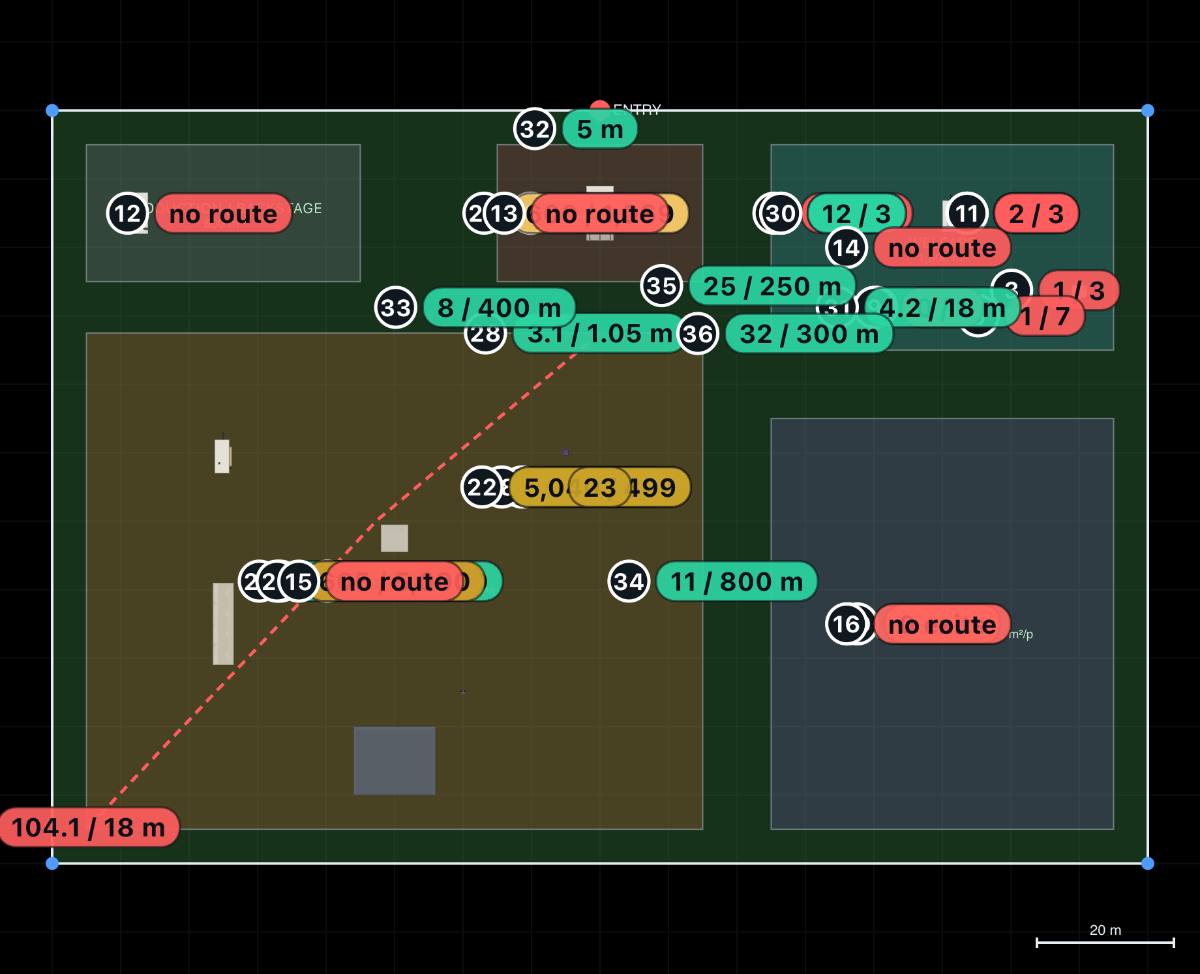
- Travel distance to the nearest exit — the farthest point of each enclosure to its nearest exit, walked along the walking graph (round the structures inside the arena, as the guide asks) against the guide's Table 5: 25 / 45 / 60 m with more than one escape route and 12 / 18 / 25 m with one, by fire-risk level; a marquee, stretch tent or gazebo is judged on the tent row — 18 m with more than one exit, 6.5 m with one — using its Exits parameter.
- Alternative exits at least 45° apart — warns when the two nearest exits seen from the farthest point are closer than 45° (the guide would discount both). The method is our reading of the guide's Figure 18, so it warns, never fails.
The emergency route
- Trackway width for a fire appliance — warns on any trackway under 3.7 m.
- Indicative vehicle routes — when no built route reaches a zone cleanly, the emergency route may use a drawn 🧭 Vehicle route (indicative) (an indicative stretch counts half as long again as a built one, so a built route wins unless the shortcut saves a third — our own weighting). A route that uses one is never a pass: it warns that the ground and the 3.7 m width must be confirmed for a 12.5 t appliance (our own rule), and adds a vehicle crossing where it leaves or crosses a kerbed road. On the indicative stretch the check also looks for what stands in the way, in the zone's phases: an event object, a building, a hedge or water across it fails; a bench, a bin store, shrubs or parked bays on it warn. Built roads and trackway are not tested for objects yet.
- Indicative pathways are not counted — and the checks say so — a 🚶 Pathway (indicative) is a line over ground, so it is never part of the emergency-route network, never a built drivable surface for the ride access check and never a vehicle approach. Because drawing one is not a record that vehicles cannot use that ground, a pathway within the 30 m vehicle review distance of a live crowd zone gets a note — never a pass and never silence — naming the nearest zone, saying the vehicle-approach checks do not count it and that a Vehicle route (indicative) or a Trackway is what they do count. Where you have drawn the pathway 2.0 m wide or more it adds that this is wide enough for a vehicle (2.0 m is our own figure for a car's width with its mirrors out, not a published threshold). The note is one per pathway, naming the nearest zone only.
- Emergency route (fire appliance) — routes the 8.3 m appliance from the vehicle entrance, along trackway or carriageway of 3.7 m or more, to every event zone and car park, and sweeps it with the tractrix engine at the guide's 16.8 m kerb-to-kerb turning circle. No route, or the appliance leaving the drivable surface, fails; a route narrower than 3.7 m, or ending more than 10 m short of the zone (our own tolerance), warns. 🚒 Auto-track fire route in the checks panel loads the worst route into the interactive sweep.
- Gates where fences cross the emergency route — where a barrier run on site crosses the route there must be a gate of at least 3.1 m within 3 m of the crossing (the width is the guide's; the 3 m is ours). A vehicle security barrier (HVM) counts too: an appliance cannot pass it, so its crossing needs a Gate or a Removable bollard / HVM opening. A plain Gate there passes this check, and the finding adds that an ordinary gate in a vehicle security line is a gap for a hostile vehicle.
- Extinguishers at each tent — one water-based extinguisher per 200 m² of floor, never fewer than two, one in a tent under 90 m², nobody more than 30 m from one (gov.uk — Checked). A Fire point inside the tent's footprint or within 5 m of it (ours) counts.
- Helicopter landing site — notes the CAA gate (landing within 1,000 m of an organised assembly of more than 1,000 people needs the organiser's written permission and CAA-notified procedures; emergency-services helicopters are exempt) and warns on a structure or crowd zone within 10 m of the pad (ours).
Movement and the queue
A walking graph is built over the site in metres: every barrier run on site in the phase is a wall, cut open where a gate sits on it; structures, buildings, water and the site edge are walls too; and the walker rounds every corner a shoulder's width (0.6 m) off it.
- Walking routes between zones — named routes: entrance → entry, entry → arena, each car park → entry, campsite → arena, arena → toilets, arena → medical. Each reports its length, the minutes at 1.2 m/s (the DfT design walking speed — Checked) and its detour over the straight line. A route warns past our own comfort lengths — car park to entry 1,000 m, campsite to arena 800 m, entry to arena 400 m, arena to toilets 250 m, arena to medical 300 m — or when it is more than 1.8 times the straight line (judged only once the detour is at least 25 m). The worst route is drawn on the plan.
- Zones with no walking route — a critical pair with no route at all ("campsite fenced with no gate") fails.
- Queue at the gate against the entry zone — the arrival profile against the lanes drawn, hour by hour: the peak queue and the hour it forms, the wait at the peak (how long someone joining the back of the queue at its peak waits at the lanes' full rate, in hours and minutes: "with a wait at the peak of 3 h 34 min", or "under a minute" for a short queue the lanes pass in less than half a minute — not a clear time), the hour it clears (counting past the gate window), and the holding area it needs at 0.5 m² a person. It reads the queue only at the end of each hour, so it says by which hour's end the queue is gone, and says so: "clears by the end of the first hour after the gates close (checked hour by hour)". The Entry zone's area is judged against that holding area. The density is ours, so this warns at most. The sidebar shows the same line in short — peak queue and its hour, the wait, the hour it clears, the holding area, the lanes drawn — ending "our model, indicative".
Site conditions: flood, ground and weather
Once you press Fetch site data in the Site conditions block (in 4 · Event, or ✅ Checks ▸ ⛰️ Site conditions), the check Site conditions (flood, ground and weather) adds findings of five kinds: flood per event zone and car park — a warning for a campsite in Flood Zone 3 (or SEPA's High or Medium likelihood), a note for everything else — one ground note with the drainage reading, plus a warning where peat is mapped; one typical weather note giving the event month's 1991–2020 averages, which are not a forecast; and, where tents, stage roofs or towers are drawn, a wind and structures note and a tower exclusion zone note. None of them ever fails, none of them states a wind speed, and when something could not be checked the finding says why instead of staying silent. See Site conditions: flood, ground and weather.
Notes, not requirements
Martyn's Law (not yet in force) and the Temporary Event Notice ceiling count everyone on site at once, staff included (attendance + crew): 800 or more meets the headcount test for a qualifying event under the Terrorism (Protection of Premises) Act 2025, which also needs public access and entry checks; events have no 200-person standard tier, which is for qualifying premises only. The duties are not in force: as read on 18 October 2026, commencement is expected in spring 2027 — and a TEN covers at most 499 people, so licensable activities above that need a Premises Licence (England and Wales). Both are always notes; a licence is a regime to apply for, not a quantity to draw.
The Martyn's Law note now also says whether the design reads as a qualifying event: yes, no or unclear (and which condition decides it), and opens the Martyn's Law readiness check. While an event may qualify, two more notes can appear:
- Vehicle approaches to crowd zones — one note for each unprotected way a vehicle can reach the arena, entry, bars and traders, or the campsite from within 30 m (our own reach): along a trackway, from the site entrance, out of a car park, or from a public road found on OpenStreetMap. The note is pinned on the unprotected stretch.
- Secure perimeter for entry checks — 800 or more on site with entry checks, but no perimeter fence with a gate on it: the qualifying-event test stays unclear without one (guidance para 5.22).
Both are part of the security layout, so the shared outputs leave them out unless you tick them in. Neither fails: the duties are not in force, and the 30 m reach is ours.
Safer area for invacuation runs wherever a safer area is drawn: inside a building or on a hard-sided structure it is a note with the most people who fit; on open ground, or running off its structure, it warns that the area does not count. It never fails — the placement rule and the density are ours. Like the safer area itself, it is part of the security layout.
Privacy screen adds wind load appears whenever a Heras run carries a privacy screen, with or without an attendance, and says how many runs and metres are screened. NFDC DRG115:2019 (temporary works hoardings guidance) warns that netting, signs or an acoustic barrier on temporary fencing can raise its wind load enough to change its risk classification, and that the fence may then need more ballast, stabilising supports or rake-back bracing. Its risk classes put a fence up to 2 m high with netting in an exposed location one class higher than the same fence without it. DRG115 is written for construction sites, so applying it to an event is our own step; the badge reads Industry guidance · Assumption for that reason. The note computes no wind load and gives no wind speed, ballast weight or spacing. Use your fencing supplier's specification sheet and a temporary-works designer's check.
The rule pack, and loading your own
Every fixed figure the rules read lives in the pack, not in the code: each threshold has its value, unit, basis, source, kind, verified status and — when Checked — the page it was read on. The checks panel names the pack in force (Event pack uk-events) with three buttons:
- Load JSON… — a client's or a council's own thresholds: a JSON object with an id, a name and a t object keyed by threshold id, each {v, basis, source, kind, verified}. A loaded pack is merged over the built-in, so a file that carries three figures changes three checks and nothing goes unchecked. It is embedded on the design, undoable and followed by collaborators.
- Export JSON — the pack in use as a file to edit and load back (the built-in goes out as a copy, since its own id is reserved).
- Built-in — drop the loaded pack and measure against uk-events again.
A loaded threshold with no basis is kept but badged as an assumption — a pack can say less than it knows, never more — and a blank or non-numeric value is refused by name rather than read as zero. The thresholds that are ours, and every source behind the rest, are listed under Sources.
A second built-in pack, UK events + Wales model byelaw template, is selectable beside the pack name. It adds one figure, and what it is and is not is explained under Rides: what is checked and what is not.
Try it on your own site
Turn a boundary into an optimised UK layout in minutes — free to start.
Open the app →