Ask a vendor for a quote
When a vendor is on the shortlist of one or more pitches, you can ask them for a quote. They get an email and a notice on the vendor portal, read your request on their phone and answer pitch by pitch. Like vendors, quote requests come with Events, which is in Beta.
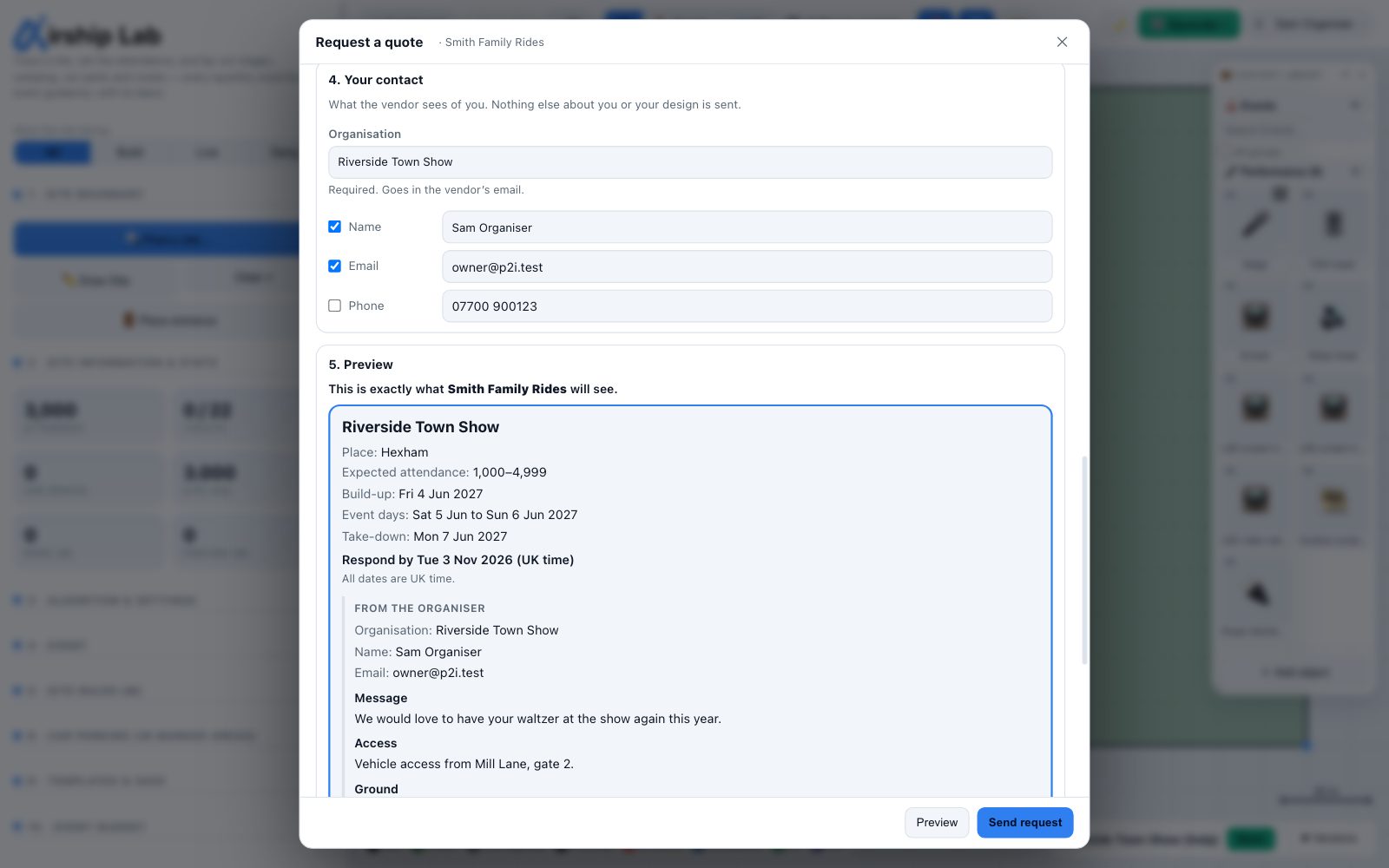
Where to start
- In the Vendors section of the sidebar, a vendor shortlisted on at least one pitch has Request quote (2 pitches).
- On a pitch row, Request quote beside a vendor opens the same window with just that pitch. So do Request quote from … in the object's right-click menu and in its inspector.
Owners and editors can send a request, and so can a Studio collaborator without the pen: asking for a quote does not change the design. Viewers cannot. Your own email address must be confirmed first, because the vendor is told by email.
What goes in a request
- Pitches. Every pitch this vendor is shortlisted on, ticked. A pitch that cannot be included is greyed out with the reason: Assigned object not found, Booked with another vendor, or Already requested from … with the date you sent it. A vendor has one open request per pitch; a pitch you add later goes in a new request.
- Dates. The build, event and derig days from your event calendar, and each pitch's own days on site. They are read-only here. With no event date set, the window says Set the event date under Attendance & demand first and nothing can be sent.
- About the event. The public event name, which goes in the vendor's email (so leave out web addresses, email addresses and phone numbers). The place: a town, or the first half of a postcode. A full postcode is refused, and a Northern Ireland (BT) postcode is never sent. The attendance as a band, such as 1,000–4,999, never the exact figure. For each pitch, an optional note (16 A supply at the pitch) and who you expect to pay whom: Open, They pay you a fee or You pay them. A message, if you want one.
- Your contact. Your organisation is always sent. Your name and email are ticked, and your phone is not. Untick anything you do not want to share.
- Preview. Preview shows the request exactly as the vendor will see it, drawn by the same code their portal uses.
Your RFQ notes are never sent on their own
The notes for the vendor (access, ground, power and delivery window) start empty. Your RFQ notes are never copied into a request automatically. Copy from my RFQ notes fills the fields from them for you to edit, and whatever you leave there shows in the preview and is sent.
Respond-by date
The vendor is asked to answer by a date 7 days ahead. You can choose any date from 2 to 60 days ahead. While a pitch is unanswered, the vendor gets a reminder 2 days before and on the day (unless they have switched reminders off). A pitch nobody quotes for expires 14 days after the respond-by date: see Cancellations, expiry and lapse.
Every date in the quote loop is a UK date. A date such as a respond-by date runs to the end of that day in London, wherever you or the vendor are.
What the vendor sees, and what they never see
The vendor sees what the preview showed: your organisation and the contact details you ticked, the event name, place, dates and attendance band, your notes and message, and for each pitch its label, the kind of object, its size on your plan, its days on site, your note and the direction you asked for. The labels are your own pitch labels (V17), so a vendor can tell roughly how many pitches your design has. They need the label on the day.
They never see your plan, any image or geometry of it, your other pitches, other vendors, your budget, your security layout, or the name of your project or workspace. The emails they get carry only the event name, your organisation and the pitch labels: your contact details stay on the request page, behind their sign-in.
Sending
Send request sends what you previewed. If the design was changed and saved since you previewed, you are asked to Save, then preview again. If a collaborator holds the pen, wait for them to save. Once it is sent, the pitch row shows the stage as it moves on:
| Stage | Means |
|---|---|
| Requested | Sent; the vendor has not opened it yet |
| Viewed | The vendor has opened the request |
| Quote v1 | The vendor has sent a quote (v2, v3… for each revision) |
| Booked | You accepted their quote for this pitch |
| Booked (event ended) | The event is over; the booking is kept as a record |
| Not chosen, Declined, Withdrawn, Expired, Cancelled | The pitch is no longer open with this vendor |
Try it on your own site
Turn a boundary into an optimised UK layout in minutes — free to start.
Open the app →